
The previous article priced a 91-day backup history in S3 with a Glacier lifecycle. This one asks a narrower question: if you keep that history exactly as it is, does adding a short-lived copy in Cloudflare R2 lower the monthly bill? The answer depends almost entirely on how much backup data you read back each month, so the article ends with a break-even rule rather than a verdict. General retention and restore-testing rules are in the backup strategy guide.
The illustrative architecture
This is a design sketch for the example, not a description of a deployed system.
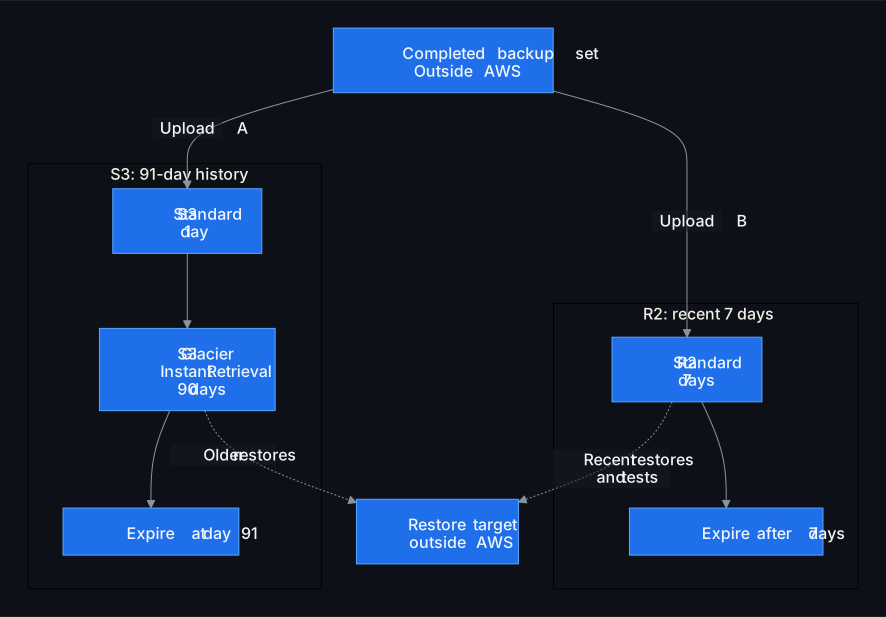
The assumptions behind it:
- The same completed backup set is uploaded by two independent jobs. The S3 history is unchanged, so the comparison is “add R2”, not “replace S3”.
- The source server sits outside AWS and has enough included transfer bandwidth for the second upload. If yours does not, count the actual extra cost on the source side.
- Existing R2 free allowances are treated as already used by other workloads. Nothing is deducted, so the figures isolate the incremental cost of the backup copy.
- There is no automatic replication between the two providers. Each copy is a separate job with its own verification.
- Backup size is a fixed 100 GB per day with no growth, matching the S3 example.
R2 prices used
From Cloudflare R2 pricing, reviewed 2026-11-06:
| Item | Price (USD) |
|---|---|
| Standard storage | 0.015 per GB-month |
| Class A operations (writes, lists) | 4.50 per million |
| Class B operations (reads) | 0.36 per million |
| Egress to the internet | no charge |
Storage and operations are billed; a free tier and rounding rules apply. R2 also offers an Infrequent Access class, but it carries a 30-day minimum storage duration and a retrieval fee. For a copy that rotates every 7 days, the example therefore uses R2 Standard. That is a fit for this window, not a claim that R2 Standard is the cheapest option in general.
Added cost of the R2 copy
A 7-day window of 100 GB daily sets holds about 700 GB at steady state:
700 GB × $0.015 = $10.50 per month, before request rounding and operations.
Operations are harder to budget than storage, because R2 bills Class A and Class B requests in whole started millions once the free allowance is used. The example takes a conservative, hypothetical account: the free allowance is already consumed by other work, and adding this backup workflow, including listing and cleanup, crosses into one additional started million in each class, with fewer than one million additional requests per class per month. That is $4.50 + $0.36 = $4.86, rounded up to a $5.00 planning allowance. It is a planning allowance, not a measured tariff. Count multipart upload parts as requests. If your account already has headroom inside a paid unit, the marginal cost can be zero; if the workflow crosses more units, it costs more. Added marginal budget for the R2 copy: $10.50 + $5.00 = $15.50 per month.
Avoided cost on the S3 side
Every GB read from S3 to a server outside AWS can incur a retrieval charge for Glacier classes plus data transfer out. Those depend on region, storage class, destination and any free allowances, and they are not in the S3 calculator. For this example a single combined budget figure is used: $0.10 per GB avoided. That is an illustrative assumption, not a published AWS tariff. Look up S3 pricing for your own region before reusing it.
With the R2 copy in place, restores and restore tests that fall inside the 7-day window read from R2 at no egress charge. The model then looks like this:
| Off-AWS restore and test reads per month | Avoided S3 cost (budget) | Added R2 cost | Net effect |
|---|---|---|---|
| 20 GB | $2.00 | $15.50 | $13.50 higher |
| 155 GB | $15.50 | $15.50 | break-even |
| 500 GB | $50.00 | $15.50 | $34.50 lower |
The symbolic rule is:
break-even monthly reads (GB) = added monthly R2 cost ÷ assumed avoided cost per GB
With these inputs that is $15.50 ÷ $0.10 = 155 GB per month. Above it, the R2 copy pays for itself on the modeled variable costs; below it, the copy adds cost and you are paying for an independent recent copy with no R2 egress charge rather than for savings.
Several qualifications apply to every row. The reads must be of copies no older than 7 days; anything older still comes from S3 at S3 prices. The 91-day S3 history is kept unchanged, the source server’s included bandwidth covers the extra upload, and the figures come before any human time or source-side overhead. All figures are pre-tax, fixed-size, steady-state and illustrative. Nothing here is a universal saving.
When the picture shifts
- Source inside AWS. Uploading each set to R2 then incurs AWS data transfer out on the way in, every day. That cost alone can erase the modeled benefit.
- Restore target inside AWS. Reads from S3 to an EC2 instance or similar are priced differently from reads to the internet. Do not assume they are free, and recompute the avoided rate for your real path.
- Copying S3 to R2 instead of a second upload. You pay the S3 read once per set, then serve repeated R2 reads from that copy. If a set is restored or tested several times, this can still come out ahead, so independent uploads are not the only economical path.
- Human time. Running two jobs adds monitoring and occasional troubleshooting. Pricing that time moves the break-even upward, not downward.
- Growth or a longer window. The R2 line scales with window length times daily size. A 14-day window at 100 GB per day doubles it.
Operating two copies without weakening recovery
A second provider only helps if both copies are trustworthy. The checklist below is the minimum.
- Produce one completed, application-consistent backup set with a checksum before either upload starts. Both copies must carry the same identity so a restore from R2 is provably the same data as the S3 object.
- Use independent identities and access policies for S3 and R2. A credential that can delete both copies is a single point of failure.
- Keep encryption keys and the backup catalog restorable without either provider.
- Monitor both jobs separately. A silent R2 failure quietly removes the benefit while the S3 job keeps reporting green.
- Make expiry cover whole sets. The 7-day window must not delete part of a multi-object set before the rest.
- Test archive restores from S3 on their own schedule. A successful R2 restore says nothing about Glacier retrieval behaviour.
- Two vendors is not immutability. Use each provider’s object lock or retention feature where you need deletion resistance, and test that it holds.
- Do not apply bucket policies or lifecycle templates copied from an article without review in your own account. The diagram above is a sketch, not a configuration.
Next step
- Measure how many GB of backup data you actually restored or test-restored to off-AWS targets in the last quarter, and how old those copies were.
- Replace the $0.10 per GB budget with your region’s retrieval and transfer-out rates. Replace the $5.00 operations allowance with your own request counts, including multipart parts, and check how many started-million units they add to your rounded Class A and Class B bill.
- Price the S3 line with the AWS S3 backup calculator, confirming the displayed rates and date. The calculator models S3 only, so compute the R2 line separately by hand as window length × daily size × storage rate, plus your operations allowance.
- Pick a window that covers your routine restores and compare the result against the break-even rule.
If you would like help confirming the restore volumes and inputs for a specific site, the web monitoring service page describes what we look at. For the storage-class side of the decision, go back to S3 Standard vs Glacier for website backups.